
ChatGPT Image Generator
I will share some chess tools with you
From Commercial Monopoly to Open-Source Freedom
If you are playing chess and using tools. You may have heard of them: Chess.com and ChessBase. The flagship product of a German company, is a powerful database software that comes with a high price tag Chess.com is the world's largest online chess platform, yet its advanced analysis features usually require a premium membership subscription. For serious chess players, ChessBase is practically the industry standard, but its licensing fees, which often run into hundreds of euros, deter many people from using it
However, free chess tools are here. The strongest engine Stockfish, constantly improving lichess analysis... and so on. So I will share some free and strong chess tools with you
I. The PC side Tools
1.1 En Croissant (★★★)
Downloads:
Windows x64 0.15.0.exe
Linux amd64 0.15.0.AppImage
Linux amd64 0.15.0.deb
Linux x86_64 0.15.0.rpm
Mac x64 0.15.0.dmg
Get it on Github
If you have download bugs. Please copy the link and go to the webpage to download
That sounds delicious. This is a free, open-source cross-platform tool with a modern user interface friendly to both new and professional chess players. It supports linking lichess.org and chess.com accounts and importing games from these two platforms. More importantly, it can call the cloud API of lichess, allowing you to look up chess openings and train with puzzles directly within the software
1.1.1 How to install the engine there
Click Add New, then click Local, and fill in the local path of the Stockfish UCI executable file you downloaded. The whole process basically involves graphical clicking operations, which is intuitive
1.2 Arena Chess GUI(★☆☆)
Downloads:
Windows 3.5.1.ZIP (Portable Version)
Windows 3.5.1.exe
Linux 64bit 3.10beta.tar.gz
If you have download bugs. Please copy the link and go to the webpage to download
The UI of Arena Chess GUI resembles the old ChessBase version, but its interface looks outdated and cumbersome. Worse still, its official website lacks HTTPS certificate, so I only rate it ★☆☆. After you install the engine, click Edit and Analyze to start the analysis
1.3 Lichess Analysis(★★☆)
Strictly speaking, this is not downloadable software, yet it serves as the primary daily analysis tool for many chess players and merits dedicated discussion. It integrates the Opening Explorer and seven-piece endgame tablebases, supports cloud analysis requests, and runs the local WASM version of Stockfish directly within web browsers. Its drawbacks are that its performance is far inferior to a natively deployed local Stockfish, and an internet connection is mandatory to access it
1.4 Stockfish
Downloads:
Windows x86-64 avx2.zip
Linux x86-64 avx2.tar
Mac.tar
If you have download bugs. Please copy the link and go to the webpage to download
Stockfish itself is a command-line program and requires a GUI for operation
1.5 How to choose these
If you are a new to chess, you can pick En Croissant; if you need software similar to ChessBase, Arena is more powerful (albeit with an unattractive interface); if you only need to analyze a single move temporarily, using Lichess Analysis in your browser is the fastest option
II.Mobile tools
2.1 Lichess Mobile App
Get it on Google Play or App Store
Get it on Github
Download: v0.24.6 2406.apk
Analysis ➡️ three dots ➡️ Stockfish ➡️ search time = ∞ Threads = 1 or 2
III.How to adjust engine parameters on the GUI interface
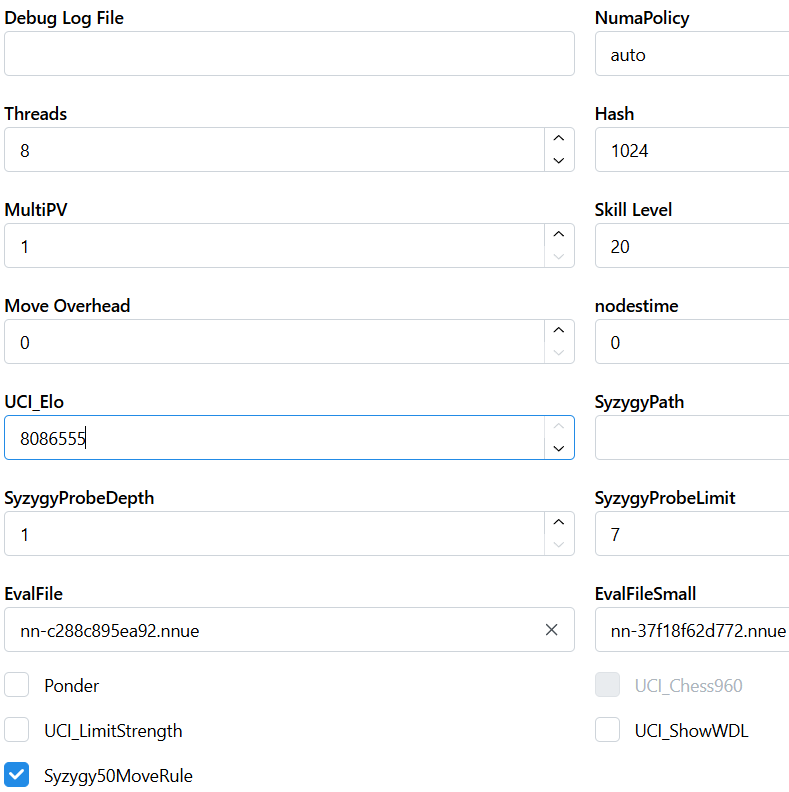 Take several most commonly used parameters as examples:
Threads: It is set to the number of physical CPU cores you have or the number of physical CPU cores minus 1
Hash: It is set to 1 GB, and it is best not to exceed one quarter of your computer's system memory
MultiPV: It is set to 1; set its value to ≥2 if you need to view multiple variations
Move overhead and nodestime: It is set to 0
You can directly paste this piece of code into the corresponding position of the JSON:
{
  "settings": [
    {
      "name": "Threads",
      "value": 8
    },
    {
      "name": "Hash",
      "value": 1024
    },
    {
      "name": "MultiPV",
      "value": 1
    },
    {
      "name": "Move Overhead",
      "value": 0
    }
  ]
You may also like
 A8086555
The engine said it is a draw I said no
Games That Even Engines Can't Calculate (Really) thibault
How I started building Lichess
I get this question sometimes. How did you decide to make a chess server? The truth is, I didn't. A8086555
Is your sacrifice a blunder?
Let me tell you why your sacrifice is a blunder, how to play a brilliant move RuyLopez1000
The Essence of a Player: Your Chess Fingerprint
You ever wanted to know which World Champion you play like? CM HGabor
How titled players lie to you
This post is a word of warning for the average club player. As the chess world is becoming increasin… RuyLopez1000