
Scientific analysis of lag compensation on lichess and chess-dot-com.
What I hoped would be an easy quick test, turned into a gigantic investigation. Not only did I torture my poor computer, I also dragged others into my struggles, got brainwashed by ads and I managed to break some very fundamental physical laws in the process.It all started with an article I read here on Lichess, which was written by streamer and chess-enthusiast ElyneLee, who somewhat scientifically compared experiences between the two biggest chess websites lichess and chess-dot-com. Here’s a link:
https://lichess.org/@/ElyneLee/blog/lichess-vs-chesscom-the-1000-game-verdict/EGNv4SvA
There are some interesting observations in that post, but the thing that stood out for me was the general feeling that lichess plays ‘more smoothly’ and chess-dot-com feels ‘heavier’ during fast-paced games. After some more research, I even found this interview of GM Nakamura and GM So actually stating the chess-dot-com doesn’t handle bullet very well (link to video; at 4:18:40). And yes, that interview was indeed done by chess-dot-com in an official event. Surely some staff members behind the scenes must have been furiously smashing their screens when that occurred.
Alas... My quest to quantify this abstract ‘feeling’ had begun.
So, let’s start with an extremely quick introduction about so-called lag. The world might be more connected then ever, but don’t forget: it’s pretty big still. Taking your move, sending it all the way across the planet to your opponent, and getting a response back, it takes some time. Actually, we should consider ourselves lucky. With common connection quality, with the size of the planet, and with the speed of light being at a stable 300.000 km/s, it typically takes like 150 milliseconds to do such an operation, which isn’t too noticeable in most online applications. But keep in mind: it’s very much not instantaneous.
Chess websites know about this. They know that depending on your connection strength and your distance to the main server, you might experience a higher lag than your opponent, which would be a little unfair, as you can often not really control those factors. So, what they effectively do, is stopping the chess clocks when a move in the process of being sent, and continue the clocks when the move is received. (As long as the lag isn’t unreasonably large.) Lichess calls it ‘lag compensation’ and chess-dot-com calls it ‘lag forgiveness’, and even though the exact implementation varies, the general idea is the same.
So when you make a move, time freezes whilst it is being sent to the main server, who passes it through to your opponents computer, after time unfreezes upon it being received. You can easily look up the delay between you and the platforms server(s) by visiting the lichess lag page (https://lichess.org/lag) or typing /ping into the chess-dot-com chat box.
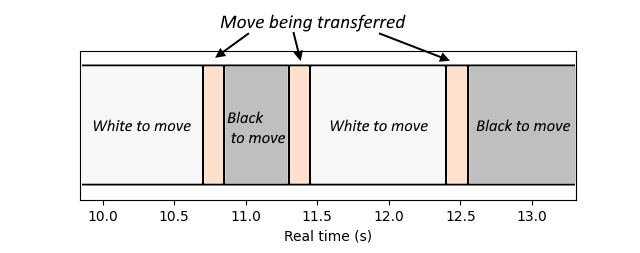 A figure just to illustrate the idea behind lag. The orange area represent the move traveling from computer to computer. Time freezes here, effectively. The time spend thinking between the white and black areas get subtracted from respectively the white and black clock.
Already here, there are differences to note. Lichess’ server is in France, whilst chess-dot-com has four servers, located in Western-USA, Eastern-USA, Europe and South-Asia (source). For each game, it selected the one that minimized lag for both you and opponent, which most often means the one closest to your locations. I couldn't find out how lichess deals with lag precisely, but chess-dot-com uses a two-move buffer to compensate lag-spikes (source). Chess-dot-com also seems to compensate differently for different time-controls (same source as above), which seems like an immensely strange choice to me, but surely they have their reasons, I guess.
Some other minor differences consist of chess-dot-com charging 0.1s for premoves, whilst lichess gives them for free, 0.00s. I guess it fits the websites philosophy. Also, lichess keeps track of hundreds of seconds, whilst chess-dot-com only keeps track of tenths of seconds. (At least, that’s what the user sees; perhaps it uses more accurate timing internally). These differences are choices that should be kept in mind, but they don’t impact this investigation very much.
Experiment 1: Real Time versus Game Time
A curious observation about lag compensation, is that games don’t actually take as long as the final clock times seem to show us. In fact, a 1+0 bullet game can take max two minutes according to the clocks (Game Time), but due to the clocks freezing during move transmissions, they often take a little over 2 minutes (Real Time). So, I defined the f-factor as f=RealTime/GameTime as a measure to test game lengths between both websites.
I played a few games on both websites whilst recording them. The video footage gave me the Real Time, and the final clock values the Game Time. I also used some footage of GM-streams of titled events on both websites. Within my very limited sample of games (N=19), lichess performed slightly better with f-values around 1.09, whilst chess-dot-com hovered around 1.11. But this difference was not at all statistically significant, with values for both websites having outliers everywhere between 1.03 and 1.20.
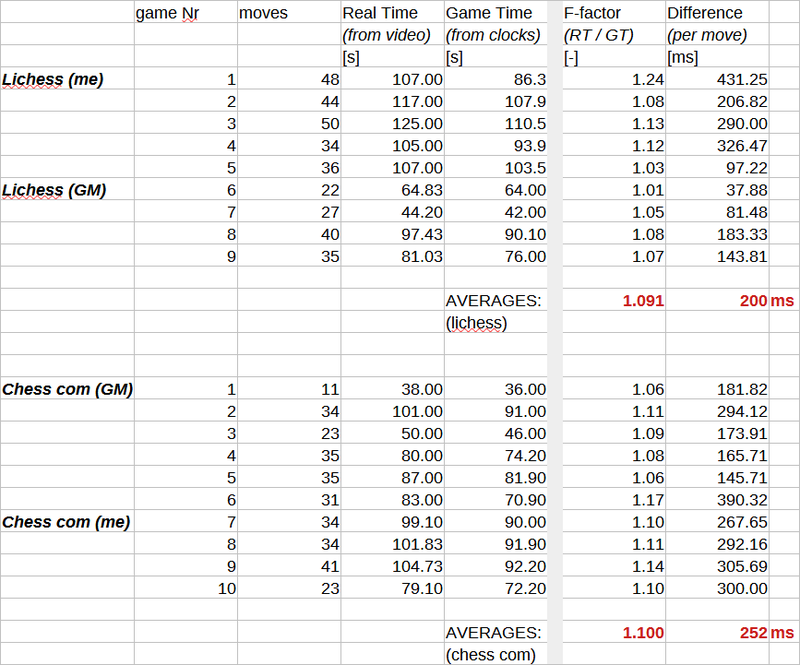
This isn’t that strange. First of all, connections quality (and hence lag) varies a lot among opponents. One of my opponents had such bad connection, that it noticeably changed the paced of the bullet game, yielding a massive f=1.24 in the end. Also the length of the games plays a large role. Games with many fast moves and premoves (with both players trying to flag each other in the endgame) have large Real Time and smaller Game Time, as the lag compensation adds up every move transmission, whilst the clocks barely go down. Chess-dot-com’s 0.1s per premoves also comes into play here, as it forces the clocks down, whereas games on lichess could theoretically ping-pong premoves back-and-forth indefinitely.
In retrospect, the difference between Real Time and Game Time divided by amount of moves would perhaps but more meaningful then taking the ratio. This would give the average lag-compensation per move. I did this, and values range from 50ms to 400ms. This makes sense considering transmission times for good and bad connections. No real difference between platforms was found though.
But one thing this experiment does tell us, is that any difference between both platforms isn’t going to be obviously large.
Experiment 2: The double recording
Then, A thought struck me. Could it be the case that chess-dot-com charges the 0.1s not only for premoves, but just generally for every move transmission? Moreover, I wanted to have more controlled experiments. Same opponent with same connection quality and location on both platforms.
Luckily for me, in a hyper-technological world with streamers and communication tools everywhere, it was actually surprisingly easy to find a volunteer to help me out. Together with The-ChessGuy (a somewhat popular Twitch streamer) we played two bullet games, one on lichess and one on chess-dot-com, whilst both recording our screens. Then, I synchronized both recordings, so that I could exactly find out on which frame moves were sent and received. With recordings in 60 frames per seconds, this would yield all transmission times and move times with roughly 30ms accuracy. With my ping being around 90ms and his ping at an insanely low 20ms, these games were really fast-paced. For those keeping track of the score at home: yes I lost both games. Adding insult to injury, I found out from the recordings that Mr. ChessGuy was already happily making random premoves, whilst I was still very seriously trying to win...
Manually finding all exact frames where the mouse button was released and where the opponents moves were received, was rather cumbersome, so I considered 20 moves of data to be enough. There was some minor issue with two moves on lichess being received before they were being sent, which is slightly problematic from a physical point of view. I will not go into details here, but information traveling back in time breaks basically all fundamentals in physics and would hypothetically result in enormous time-paradoxes. But upon further inspection, instead of making mankinds greatest scientific discovery ever, I just made a typo...
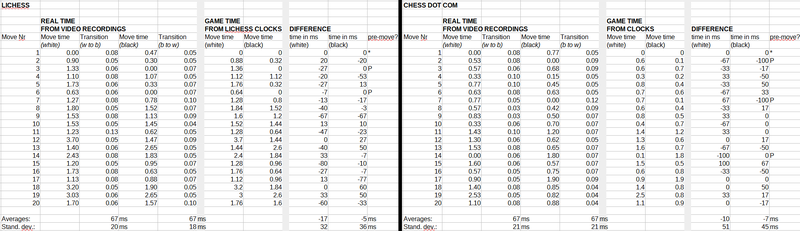
The results are surprisingly clean and very similar for both platforms. The move times from the video material are basically identical to the moves times the websites have subtracted from the clocks. Not even for a single move is the difference larger than 100ms, which I more-or-less consider the resolution of my measurement. The transmission time is also really consistent, being around 67ms with a standard deviation of only 20ms. No significant differences were found between both platforms.
The 67ms fully agrees with prior expectations by the way. Ping is the time for a signal to travel back and forth from the server, so with my 100ms and Guy’s 20ms, this means it takes 50ms+10ms = 60ms for a signal to travel from me to the server to Mr. Guy.
To conclude this experiment: everything works as expected. The lag is (in this experiment at least) really stable and reliable, and the move-times agree exactly with the time actually spend thinking. Lag spikes did not occur. My initial thought turns out to be false: chess-dot-com does not subtract 0.1s from your thinking time each move. The clock only starts running after a move is received and stops directly when you release the mouse button. Premoves are the only exception.
Experiment 3: Lowering processor power
The attentive reader might notice that my quest of revealing the hidden mystical differences between both websites, is not going particularly well. I figured though that the experiment above occurred in really good conditions, and that some kind of stress-test was perhaps necessary to compare both platforms functionality under bad circumstances.
So, what I did, was lowering my computers maximum processor power to just 5%, which is real torture for both the PC and its user. It gets annoyingly laggy. Every mouse input takes a while to register, every window takes a few seconds to open. It makes you think twice before you decide to click on something.
Under these conditions, I played games on both platforms. My pings went up towards like 150ms, and dragging pieces across the board was very laggy, having serious impact on how I managed to play the bullet games.
Lowering the processor power definitely had a strong negative impact on my experience, but it was about similarly bad on both platforms, as far as I could honestly tell. In fact, I don’t think it had any impact of the websites’ internal functionality whatsoever. My computer had trouble tracking mouse movement smoothly regardless of what I was doing. Whether that would be moving windows, or dragging files, or dragging pieces around, didn’t matter.
Experiment 4: Loading advertisements on chess-dot-com
However, I did notice something interesting in experiment 3. The advertisements on chess-dot-com take time to load, which gets pretty noticeable with poor processor power. Also, I remembered long long ago I had issues with a certain plane-ad that lagged my computer so badly, that it actually cost me a few bullet games every time it showed up. So, I dived into the wonderful world of ads, to find answers. I think I currently know more about the exact details of chess-dot-com ads than anybody else on the planet.
Let me enlighten my readers. The displayed ad refreshes precisely every 30s. Three different types I could distinguish: video-ads, google-selected ads and ads for chess-dot-com products. I expect the video ads to most demanding with regards to load times, but these were too rare to experiment with. Google-selected-ads have different loading times per ad, but for each individual ad the loading times are pretty consistent. Chess-dot-com ads had much lower loading times, like 4 times faster. The advertisements appear to come in batches, with sometimes many chess-dot-com, and sometimes many Google. When an ad refreshes after 30s and exactly the same ad returns, it still has to be loaded. This is of course a pretty stupid waste of computing resources.
So I opted to make the most random and silly graph of all time: ad loading time as a function of processor power. I focused my personal favorite Google ad, a rather dubious investment ad (sorry my dear shoe-ad, you were a good second place...) as it seemed to appear most often with rather high loading times. Recording with 60fps also impacts the measurement of course, by the way, as it’s also pretty demanding for the PC.
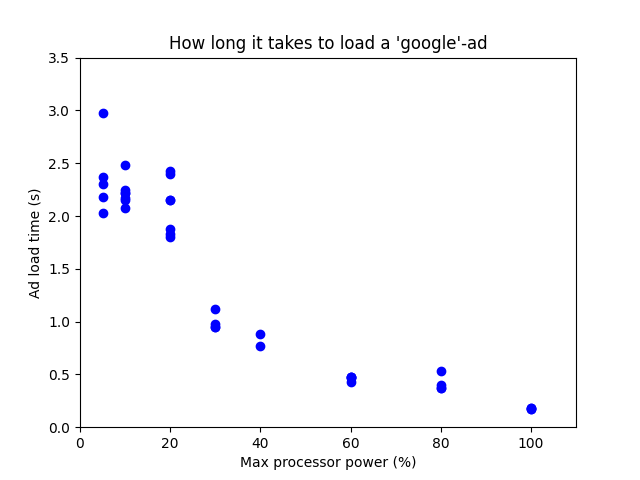
And here it clearly shows how bad things can get. At low processor power, it takes up to 2 seconds to load. But more surprisingly, it even takes about 0.1s to load at 100% (whilst recording). That isn’t that much, but in the heat of a time scramble, I’d say that’s a pretty non-negligible amount of time. A mouse being laggy for 0.1s is probably a noticeable nuisance.
Experiment 5: Moving whilst advertisements refresh
I wanted to continue this ad-research. I wondered what would happen if I would make a move exactly during the ad-transition. With the very reliable 30s ad-cycle, that had to be possible to do by force. So I asked my girlfriend to help, and luckily, she was delighted to run a timer and inform me of the upcoming ad-transitions. I also wrote a little python-script to monitor all mouse presses and releases, so that I could compare when inputs were performed by me and when they were actually registered by the website. The program ran at max speed, slowing down my computer even further.
Let me stop here for a second so that everybody can grasp an understanding of the current hilarious setup. Here we sit with an insanely laggy computer (processor power 10%), with recording software running, together with a flashing python script, hoping we get a ‘good’ (most laggy) advertisement. Every 30s I receive a scream in my ear and I try to time my moves exactly at the transition. I attempt to play a decent game of chess, but simultaneously there is this minor issue on my mind that chess websites probably see mouse-movement trackers as a gigantic red-flag for cheating purposes. You can understand why, I guess. Luckily for me, the rather unfavorable circumstances caused the played games to be ‘not the best ones ever’, so my account appears to be still alive. Seriously, they were all abysmally bad, but it’s a sacrifice I’m willing to make in the name of science. I wish my opponents all the best with the donated rating points.
I didn’t get much data, but a few moves were timed exactly right. And the results are actually very simple: when an ad loads, all functionality freezes. When the ad is loaded, then finally everything unfreezes and the move is being sent the same frame. No time is compensated when this happens. If the ad take 2.0s to load, then you might lose 2.0s with unlucky timing. Like, I see from my recordings and my python script that I release the mouse after 4.0s of thinking, but the ad has to load first for a second, and I get charged for 5.0s of thinking.
One time a move was received during an ad-transition (which I couldn’t control, but I was lucky it happened randomly.) In this case lag was compensated. In the recording, I saw my clock getting like 1.3s back after the ad was loaded in.
Experiment 6: Overloading the Internet bandwidth with other stuff
I was about to publish these five experiments with a conclusion basically saying ‘I dunno’, but then I decided I could try to squeeze in one more thing. And I happy I did it, because it looks relevant.
As everyone knows, the amount of data traveling through ones internet has a maximum speed. So what would happen if we try to overload it? I came up with two ways to do that: (1) simultaneously loading 5 high-resolution Dora-the-Explorer Youtube videos in the background and (2) downloading enormous GB-files from the lichess game-database. Here are the results:
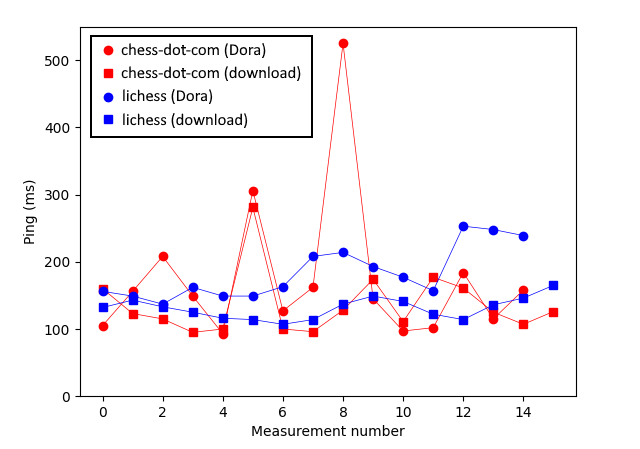
Now, the chess-dot-com points are more scattered, clearly showing lag-spikes (I plotted a line through the points to clarify), but I cannot draw any conclusions from that, because I very seriously suspect lichess takes a moving average when displaying the ‘ping’-value, flattening out any spikes.
However, it does show the lag getting very real and very inconsistent. If I read this information correctly (source), chess-dot-com only forgives a maximum lag of 250ms for bullet. In the circumstances tested here, I would go over this threshold every now-and-then. How lichess deals with lag exactly, I could not find, unfortunately.
Conclusion
So that’s all. I have no conclusive evidence to support the experiences of others that chess-dot-com is more laggy. In perfect circumstances with a good connection and a good computer, everything seems to work fine, so I feel that if a difference between both websites exist, it must have something do to with either one of these two things: (1) bad connection and/or the computer somehow doing stuff in the background, giving that task priority or (2) both websites dealing differently with lag spikes. The maximum tolerated bullet-lag of 250ms on chess-dot-com seems pretty strict to me here. Also, I could verify that ads are for sure a source of unwanted lag, but I’m not sure if they occur frequent enough with enough impact to really explain the complaints. Perhaps others get more video ads than me, which possibly could cause issues.
Also, there is something interesting to note about chess-dot-com having 4 servers. Choosing the fastest one available makes things faster sometimes, like my game with Mr. Guy, but slower games will still exists when your opponents lives on the other side of the planet. My connection to Europe is at a stable 100ms, but the ping to Asia always floats around 450ms. This raises a real issue: if I play an opponent from Asia with exactly opposite pings, which server is chosen? (We forget about both American servers for simplicity.) If Europe is chosen, are they punished for lag? And if Asia is chosen, am I punished for lag? It’s basically a coin-flip, but if I understand lag-forgiveness correctly, only 250ms forgiveness means that one of us gets an unfair disadvantage, even though our Internet quality is basically identical.
Anyhow, hopefully this settles some questions, but I fear it only creates more questions, especially when people have opposite experiences. What’s left to do is thanking all people I dragged into this mess. Elly for the excellent initial research plus communication, Mr. ChessGuy for the excellent bullet games, and my loyal girlfriend for excellent timing skills. Sorry for all opponents being unknowingly dragged into the most intentionally laggy games ever played on the Internet.
You may also like
 DaBassie
Chess boards rotated by 90 degrees and occurrences in other sports
This blog post is not about chess. Also, it is pretty stupid. Please, do only read it if you have th… DaBassie
A mildly funny observation in the King’s Indian
Something about Be2 and Bd3. Admittedly, this is probably not the funniest thing you have ever read … CM HGabor
How titled players lie to you
This post is a word of warning for the average club player. As the chess world is becoming increasin… TotalNoob69
The REAL value of chess pieces
... according to Stockfish thibault
How I started building Lichess
I get this question sometimes. How did you decide to make a chess server? The truth is, I didn't. DaBassie