
Noobmasterplayer123
ChessAgine Lichess Lobby Integration
Integrating the Lichess Board API into ChessAgine
Intro
Hey all, I'm back with another blog post about ChessAgine. In this blog, I will go over a connectivity problem I had been sitting on for a while and how Lichess's Board API turned out to be exactly the right solution.
If you have used ChessAgine for a while, you know the usual workflow. You play a game on Lichess, you finish it, you come back to ChessAgine, you paste the PGN or the game URL, and then Agine does the game review. It works. But it always felt like one step too many.
The bigger annoyance was this: I wanted to play a game and immediately have Agine ready to review it, without any copy-paste in between. Even better, I wanted ChessAgine to be the interface I play from, not just the tool I come back to after the fact. That dream was blocked by one thing. ChessAgine had no way to actually make moves on Lichess. It could read games. It could fetch them. But it was a read-only client. Playing was off the table.
I thought about building a standalone chess server into ChessAgine, but that is massive scope creep. Lichess already does all of that matchmaking, clocks, anti-cheat, pairing logic and does it better than I ever could. Reinventing all of that: no thanks. What I actually wanted was simpler: let ChessAgine talk to Lichess's existing infrastructure, move by move.
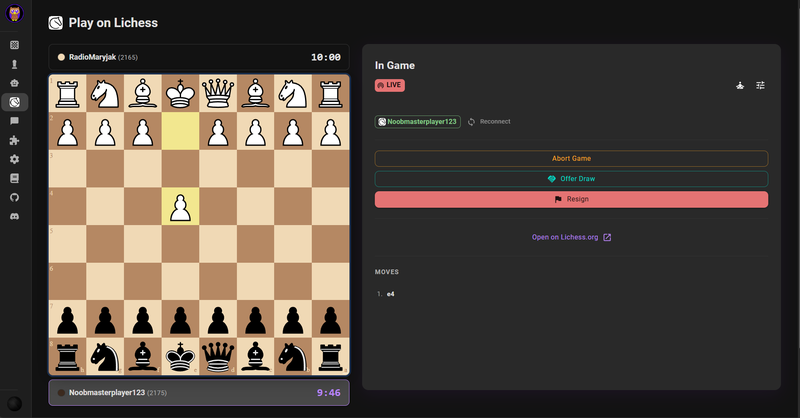
(Playing on Lichess via ChessAgine play page)
Lichess Board API
Lichess has a public Board API that lets external applications create and play games on Lichess on behalf of a user. It is designed exactly for this use case: external GUIs and apps that want to plug into Lichess's game server without rebuilding it.
The Board API works through a combination of HTTP endpoints and NDJSON streaming. You create a game seek via a POST request and then stream the game state in real time using a long-lived GET connection that delivers newline-delimited JSON events. Every time your opponent moves, you get an event. Every time the game ends, you get an event. Your app listens to the stream and sends moves back via a POST call.
The key pieces I ended up using:
POST /api/board/seek— posts a seek to the game pool (time control, rated/casual, colour preference)GET /api/stream/event— user-level event stream that delivers thegameStartwhen a match is foundGET /api/board/game/stream/{gameId}— streams live game state, moves, clocks, and draw offersPOST /api/board/game/{gameId}/move/{uci}— sends a move in UCI notationPOST /api/board/game/{gameId}/resign— resigns the gamePOST /api/board/game/{gameId}/draw/yesand/draw/no— offer or decline drawsPOST /api/board/game/{gameId}/abort— aborts a game with fewer than 2 moves played
One important constraint I ran into: the Board API's seek pool only accepts Rapid and Classical time controls. The math is that the estimated game duration (time × 60 + 40 × increment) needs to be at least 480 seconds. Bullet and Blitz are excluded, they need a direct challenge instead of a pool seek. ChessAgine's available time controls reflect this, ranging from 8+0 Rapid all the way up to 60+0 Classical.
 (Lichess Board API docs can be found here)
Auth Flow
One thing I wanted to get right from the start was the authentication flow. The old way some tools handle this is to ask you to generate a personal access token in your Lichess settings manually, copy it, and paste it into the app. That works, but it is tedious and easy to get wrong.
ChessAgine uses OAuth 2.0 with PKCE (Proof Key for Code Exchange) instead — the same security standard used by major apps that connect to external accounts. When you click Connect Lichess in the settings, here is what actually happens:
- ChessAgine generates a random
code_verifierand acode_challenge(a SHA-256 hash of the verifier) on the client side and stores the verifier in sessionStorage. - You get redirected to
lichess.org/oauthwith the challenge, ChessAgine's client ID, and the requested scopes (board:playandstudy:read). - Lichess shows you its standard authorization screen. You click authorize.
- Lichess redirects back to ChessAgine's
/lichess/callbackpage with a one-time authorization code. - ChessAgine exchanges that code (along with the original verifier) for an access token — without ever exposing a client secret, because PKCE doesn't need one.
- The token and your Lichess username are saved in localStorage. ChessAgine never stores credentials on a server.
After that, the Connect Lichess button shows your username as a green chip. You are ready to play. No manual token generation, no copy-pasting, no settings files to edit.
 (Full flow diagram from the moment you click the connect button to start playing via Board API)
How I Wired It into ChessAgine
The integration is built around three concurrent SSE streams that run in parallel during a game. Getting their ordering right was actually the trickiest part.
The event stream (/api/stream/event) has to be opened before the seek is posted, not after. If you open it afterward, you risk missing the gameStart event that carries the game ID and your assigned colour. I learned this the hard way. The seek fires, a game is found, the gameStart lands on the event stream, and if the stream wasn't listening yet — you're stuck in a seeking state with a game already running on Lichess. So the order is always: open event stream → post seek → wait.
The seek connection itself is interesting. The POST /api/board/seek endpoint doesn't return a one-shot HTTP response — it keeps the connection open with an NDJSON body while you're in the pool. Closing it cancels the seek. So ChessAgine keeps that body draining (reading chunks and discarding them) until either the seek is accepted (abort signal fires from the gameStart handler) or the user cancels. This was a non-obvious design decision from the Lichess API docs: the seek body must be continuously consumed, or Lichess drops you from the pool.
Once gameStart arrives on the event stream, ChessAgine opens the game stream (/api/board/game/stream/{gameId}). The first event is always a gameFull object containing the initial board state, both players' info, and current clocks. Every move after that arrives as a gameState event with the full move list in UCI notation, updated clock times, and draw offer booleans (wdraw/bdraw).
Draw offers were a fun discovery. They don't come as a separate event type; they show up as boolean fields on the gameState event. When bdraw is true and you're playing white, your opponent has offered a draw. ChessAgine watches for these on every state update and renders an Accept/Decline prompt accordingly.
For move execution, ChessAgine optimistically updates the local board before the server confirms, which keeps the UI feeling instant. The actual send is a POST /api/board/game/{gameId}/move/{uci} where the move is in UCI format (like e2e4 or e7e8q for promotion). The game stream then comes back with the server-confirmed state, which syncs everything back up.
The Payoff: Agine Reviews Without Any Extra Steps
The real reason I built all of this was what happens after the game ends.
Before this integration, the review workflow was manual: game ends on Lichess → go to ChessAgine → fetch the game by URL → hit the review button. Three steps and a context switch every time.
Now, ChessAgine builds the full PGN move by move from the game stream as the game is played. When a terminal status event arrives (mate, resign, draw, timeout, etc.), ChessAgine immediately constructs the final PGN from everything it has accumulated. The moment the game ends, you see a Review This Game button on the game-over screen.
Clicking that button writes the PGN, move list, and game metadata (players, time control, result) into sessionStorage under the keys that ChessAgine's game review page already reads. Then it navigates to the review page. Agine picks up the session data and starts the review immediately. No re-fetching from Lichess. No copy-paste. No waiting.
This is the workflow I actually wanted. Finish your game, click one button, and Agine review is already walking you through the critical moments, theme progressions, and where things went wrong.
 (Doing post-game analysis after playing on Lichess, in agine itself)
Try It!
The Lichess play feature is live on the ChessAgine Play Page. You need a Lichess account; that is it. Click Connect Lichess, authorize through the OAuth flow, and you are in. Play a game, finish it, hit Review, and see what Agine makes of it.
This is the first version, and there is a lot of room to grow. Direct challenges, correspondence game support, better post-game stats, patterns across multiple games, there are plenty of directions this could go. I am genuinely curious what people find useful and what feels missing once they actually play through it.
If you want to suggest improvements, report something broken, or see what else is in the works, come join the ChessAgine Discord or post in the forum; that is where I pick up most of the ideas that end up in the next update.
Thanks for reading!
Noob
You may also like
 Noobmasterplayer123
Extended Ease Metric (2): Variation Ease
How easy is a given chess variation? thibault
How I started building Lichess
I get this question sometimes. How did you decide to make a chess server? The truth is, I didn't. Noobmasterplayer123
Neural Net Engine Database (NNEDB)
An API gateway to latest chess neural nets move probabilities, evals and more Noobmasterplayer123
Human Estimate Eval Function
If a human or human-like model assessed this position, what centipawn score would reflect their perc… TotalNoob69
Customizing Lichess pieces, boards, sounds and more with LiChess Tools
... not exactly technical, but many people requested this neilgd72