
30 Days In: How I Actually Use Forkline — A Full Prep Cycle on Six Real Openings
[Continuation of the previous post — if you missed it, start here.]
Link to the app: https://forkline.online/
Discord for feedback/bugs: https://discord.gg/DZCtYWGdj
When I posted about Forkline last month, the most common question wasn't "what does it do" — it was "how do you actually use it day to day?"
Fair question. A tool's features list is one thing; a real workflow is another. So in this post I'll show you the exact cycle I run on my own repertoires, end-to-end:
- Compose my openings — main lines I know cold, by hand; sidelines I don't, by auto-generator
- Audit each repertoire through Gap Analysis to find holes I never thought about
- Play real games on Lichess and feed them into Game Analysis
- Drill the resulting flashcards in the Trainer
Six repertoires (four for White, two for Black), six recent Lichess games, one full week of prep. Let me walk through it.
Step 1 — Composing the Repertoires
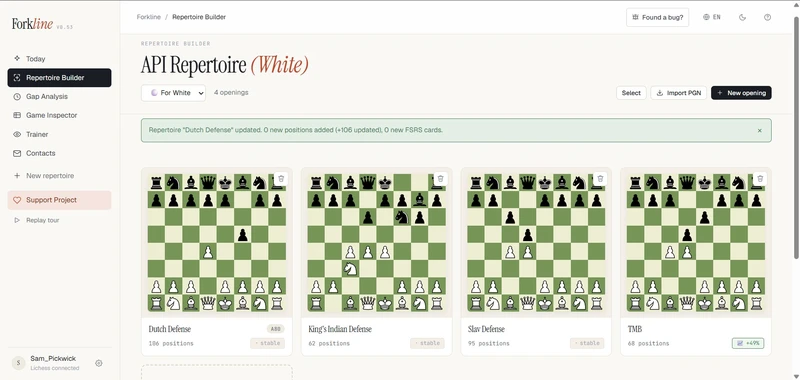
I play Queen's Gambit (TMB lines), Slav, Dutch, and Grünfeld setups as White; King's Indian and French as Black. That's six repertoires to maintain. In the past this meant six ChessBase files spread across two laptops. Now they live in one place.
Manual mode for the lines I know
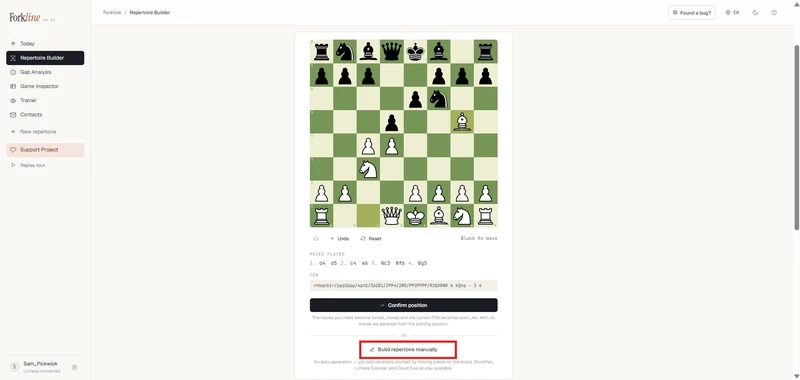
I started with the Queen's Gambit. This is my main weapon as White — I've played it for a decade and I know exactly which sub-variations I want in the repertoire. Auto-generating it would just give me what Stockfish thinks is best, not what I've decided to play. So: manual mode.
The setup wizard is point-and-click. You play moves on a board with click-to-move or drag, and the wizard records them. When I'm done with the spine, I hit "Create repertoire manually" and Forkline drops me straight into edit mode on the resulting tree.
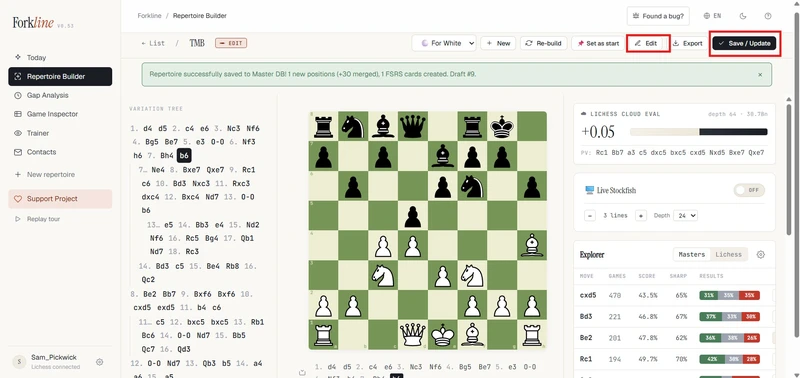
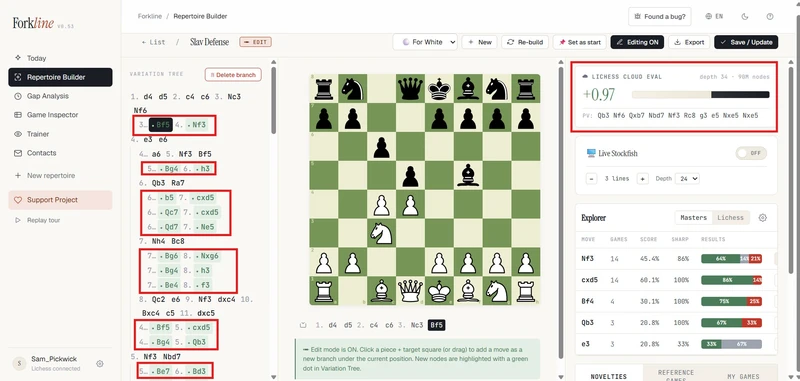
From there, every move I add via click-and-drag on the main board appears in the variation tree on the left as a new branch, marked with a small green dot showing it was added in this session. Forks (where I want two responses to the same opponent move) are handled by a small dialog that asks: "Add as sideline, promote to mainline, or replace?" — same affordance ChessBase has, no surprises.
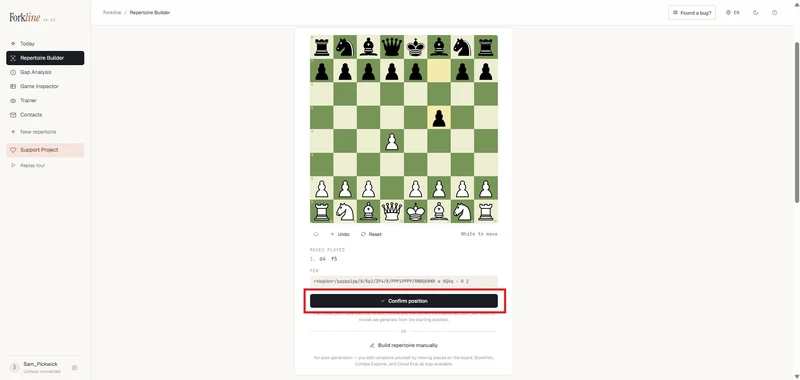
I composed the Slav, Grünfeld, King's Indian (Black), and French the same way. They're openings I've played hundreds of times — manual composition takes 20-30 minutes each and gives me a tree that matches my actual repertoire, not a generic engine line.
Auto-generation for the lines I don't
The Dutch Defense is different. As a 1.d4 player I get the Dutch occasionally, but I've never put serious work into a response. I don't have strong preferences; I just want a reasonable, master-database-backed line I can lean on until I face it enough to develop my own taste.
This is exactly what the auto-generator is for. I picked "Master Prep" preset (depth 10, populated from my own Masters DB), pointed it at the Dutch entry position, and hit Build.
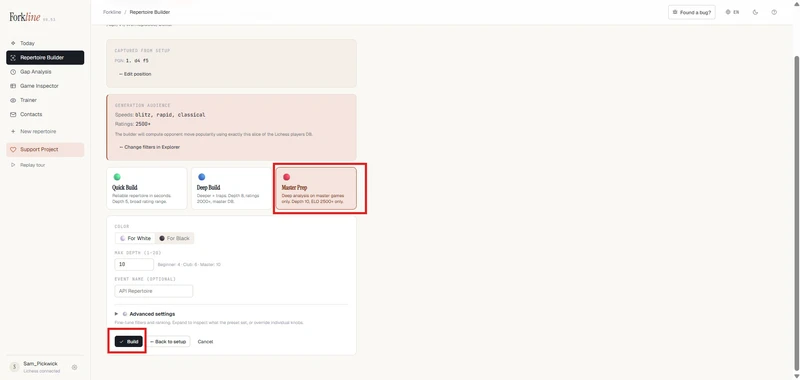
The build streamed positions in real time — I could watch the tree grow live. About 2 seconds and 100-ish nodes later I had a complete Dutch repertoire grounded in master-game statistics, with Wilson-score-ranked candidate moves and Cloud Eval annotations on every leaf.
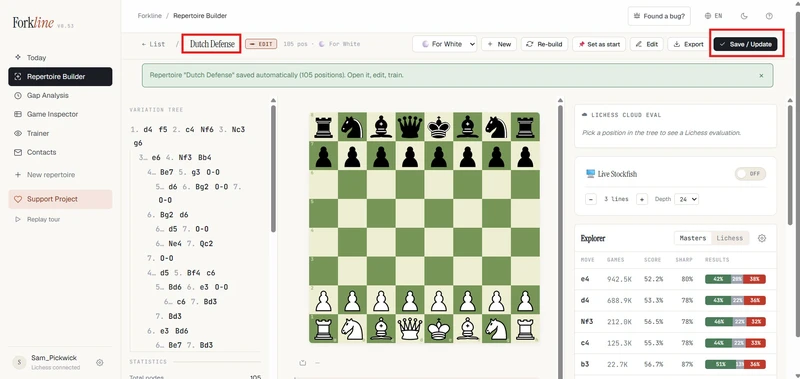
This is the right balance. Manual where I have opinions, automated where I don't. Six repertoires composed in about 1 hour total. ChessBase would have taken me a weekend.
Step 2 — Gap Analysis: What Did I Miss?
Composing a repertoire is easy. Knowing what you forgot is hard. This is where Gap Analysis comes in.
I ran each of my six repertoires through it. The check is simple: walk through the tree, and at every opponent move, ask Lichess: "What moves do real opponents at my rating range play here that my repertoire doesn't cover?" Each missing move gets a danger score (frequency × evaluation × position depth) and a category — Theory, Trap, Opportunity, or Sideline.
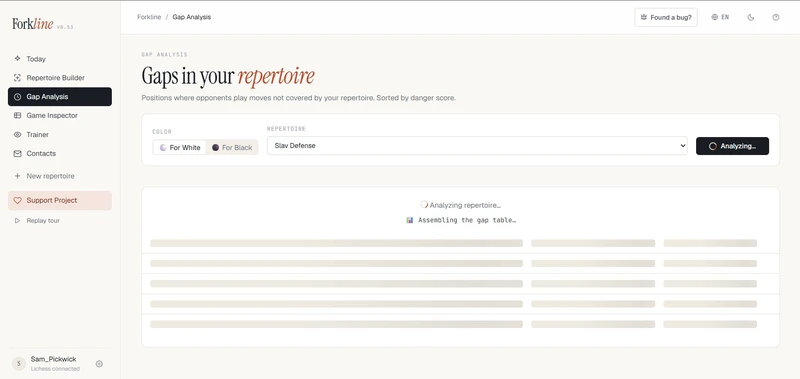
On my Slav Defense alone, Forkline found 96 gaps — three of them critical (danger score ≥70). I literally would have had to think over the board if I'd faced it.
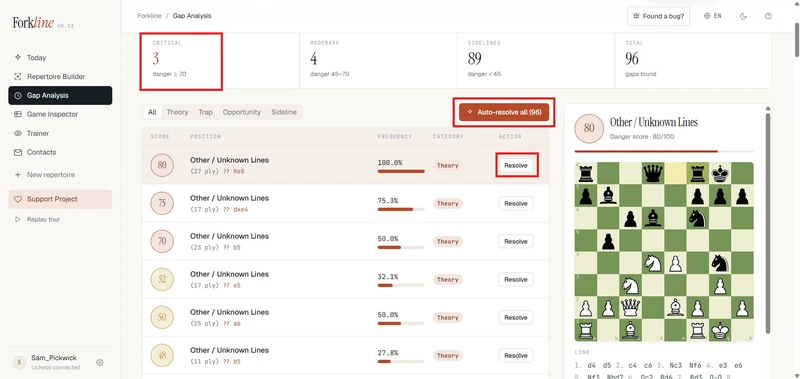
The detail panel for each gap shows the position, the missing move highlighted on the board, the frequency and Lichess evaluation, and three smart actions:
- Auto-Resolve — Forkline looks up the best master-level response and stages it in the Builder for me to review
- Open in Builder — jump straight to that position in the relevant repertoire to compose the response manually
- Train this gap — push the bare position into the FSRS Trainer
The new Auto-Resolve All button — added recently to handle batches. One click, and Forkline pre-fetched all the master-database lookups in parallel, then staged AI's best replies for every gap at once. I reviewed them in the Builder, accepted most, tweaked two, and committed.
Step 3 — Real Games + Game Analysis
A repertoire is only as good as it holds up under pressure. So I played six rapid games on Lichess (15+10), trying to steer every game into prepared territory.
Forkline's Game Analysis takes your Lichess username, fetches your recent games, and classifies each one against your repertoire:
- 🟢 Perfect Theory — every move was in your prep
- 🔴 My Deviation — you played something not in your prep (the painful one)
- 🟡 Opponent Novelty — your opponent left book first; this is where you can extend your repertoire
- ⚪ Out of Book — the game left theory early
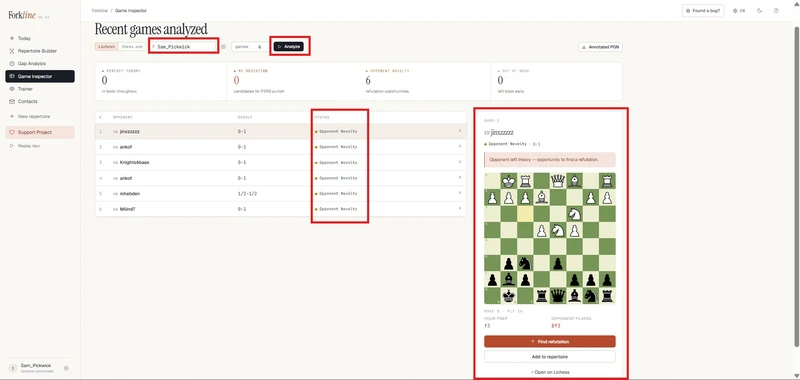
Out of my six games:
- 6 opponent novelties (an unprepared try by my opponent that I navigated by feel)
The detail panel for each game shows the exact ply where things went off, the move I should have played, and the move I actually played, plus smart actions appropriate to the status.
For the deviations I clicked Open in Builder. A small dialog popped up showing all my matching repertoires with the suggested one (the one containing this position) pre-checked.
I picked the suggestion, Forkline navigated me to the exact position in the right repertoire's variation tree, and I added the correct move as a new branch — same click-and-drag flow as initial composition.
For the opponent's novelty, I used Find Refutation — Forkline queried the master database for the best response to my opponent's sideline, then staged that move in the appropriate repertoire as a new branch. Two clicks. Done.
Step 4 — The Trainer: FSRS-Scheduled Drilling
Every new position that touches a repertoire — whether via initial build, gap resolution, or game review — gets an FSRS flashcard. After a week of prep cycles, my Trainer dashboard looked like this:
I drilled in 10-card sessions. The drill UX recently went through a big overhaul (zero-click flow), and it shows: there's a dynamic notation panel that updates as you play, auto-grading based on how fast and how cleanly you find the move (no more clicking Again/Hard/Good/Easy after every card), a hint system with two levels (highlight the from-square, then show the from→to arrow), and visual feedback — the board flashes green for correct, red for wrong.
When I missed a move, Forkline's Stockfish (running locally in your browser via WebAssembly) compared my move to the prepared move at depth 14. If they were close — within ~0.5 pawn — I got a "Good alternative!" prompt and partial credit. If my move lost serious eval, I got a "Hard Fail" warning with a red arrow showing the refutation. Brutal, but exactly what I needed.
After ~20 minutes I'd cleared the day's due cards. The summary screen at the end showed me 14 correct, 3 alternatives, 2 hard fails, 1 hint-used — and gave me a ranked list of the positions I missed so I knew exactly what to revisit.
What I've Noticed After a Month
The closed loop matters more than any single feature. Building → checking → playing → drilling, in that order, with each step feeding the next, catches mistakes that any individual tool would miss. Composing without Gap Analysis leaves blind spots. Gap Analysis without games leaves theoretical fixes you never actually need. Games without the Trainer leave you to forget what you learned by next week.
Manual + automatic is the right mix. I was skeptical at first that an auto-generator could produce a repertoire I'd actually use. For openings I have opinions about, no — manual composition wins. But for openings I face once a month, the Master DB-backed auto-gen is more reliable than what I'd patch together in 30 minutes of my own thinking.
FSRS scheduling is the part I underestimated. Drilling lines on a fixed daily schedule felt like overkill until I sat down for the third week in a row and realized I was recalling moves I used to think about. That's the whole point of spaced repetition — and chess prep is a textbook fit for it.
If you're interested in trying this workflow on your own repertoires, Forkline — free, sign in with Lichess. Bug reports, feature requests, and "this section confused me" feedback all welcome.
Link to the app: https://forkline.online/
Discord for feedback/bugs: https://discord.gg/DZCtYWGdj