From your lack of feedback, I assume LiChess Tools is perfect and has absolutely no bugs. That's good. :) I will be focusing on my holidays so if anything goes boom, expect delays or even no response from me until next year.
But just so you know I care, I've added a lot more custom chess piece sets and improved the selection system for custom boards.
Quick refresher:
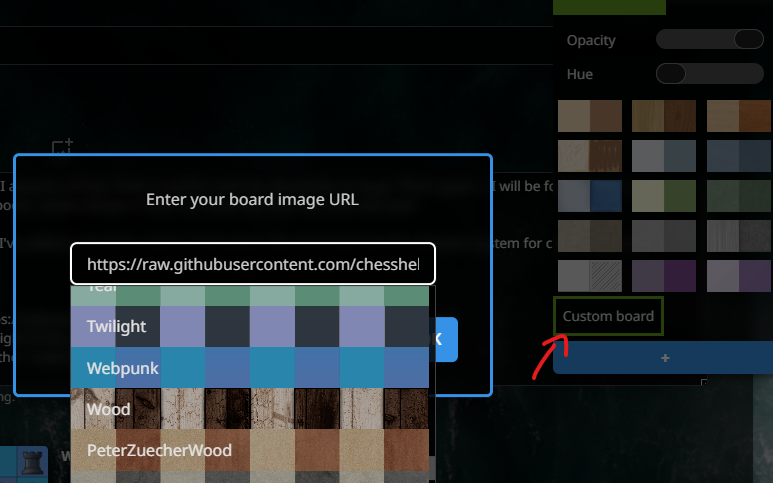
Custom board images
- Open the user menu (top-right of the screen, click on your user name)
- Select "Board", then press the + button for all options
- Click on Custom board
- Either select a board from the dropdown or add your own URL for it
Advanced note: you can use data URLs, too: data:image/svg+xml;utf8,<svg xmlns='http://www.w3.org/2000/svg' width='800' height='800' viewBox='0 0 8 8'><defs><pattern id='p' width='2' height='2' patternUnits='userSpaceOnUse'><rect width='1' height='1' fill='%23f0d9b5'/><rect x='1' y='1' width='1' height='1' fill='%23f0d9b5'/><rect x='1' width='1' height='1' fill='%23b58863'/><rect y='1' width='1' height='1' fill='%23b58863'/></pattern></defs><rect width='8' height='8' fill='url(%23p)'/></svg>
I know the UI is not very polished there and there are some bugs. I will work on it, but not this year :) If it seems like the board is not being used, check to see whether the Grid Squares theme is set. That theme is special and interferes with board images.
Extra piece sets
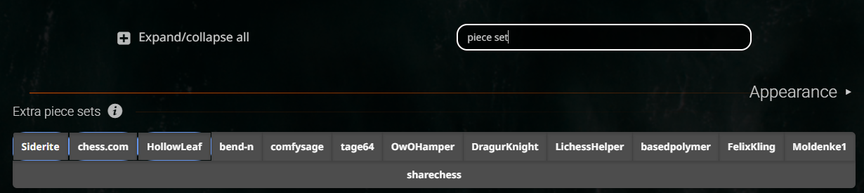
- Open the user menu (top-right of the screen, click on your user name)
- Select "LiChess Tools" to go to the LT preferences
- Write "piece set" in the filter there
- Enable the piece set categories you want available
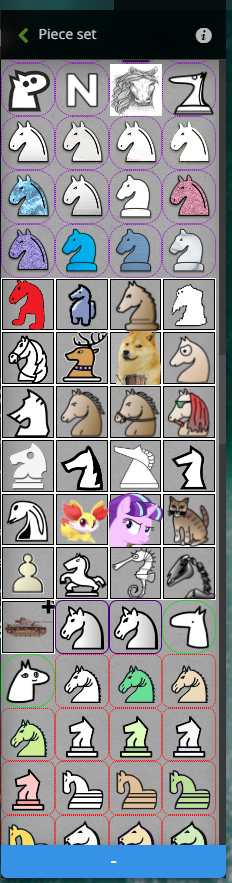
- open the user menu again
- Select "Piece set" then the blue + button for all options
- Choose your favorite piece set
Note: some of the boards/piece sets have dubious origin and in some contexts they are unavailable in code. That means that in some situations the Board Image functionality, the one for the SCREENSHOT button, will use default maple board and/or default cburnett pieces instead of what you selected. But it should be working fine on the board itself.
Happy holidays and a wonderful new year to you all!
From your lack of feedback, I assume LiChess Tools is perfect and has absolutely no bugs. That's good. :) I will be focusing on my holidays so if anything goes boom, expect delays or even no response from me until next year.
But just so you know I care, I've added a lot more custom chess piece sets and improved the selection system for custom boards.
Quick refresher:
[Custom board images](https://siderite.dev/blog/lichess-tools---user-manual/#customBoardImage)
- Open the user menu (top-right of the screen, click on your user name)
- Select "Board", then press the + button for all options
- Click on Custom board
- Either select a board from the dropdown or add your own URL for it

Advanced note: you can use data URLs, too: `data:image/svg+xml;utf8,<svg xmlns='http://www.w3.org/2000/svg' width='800' height='800' viewBox='0 0 8 8'><defs><pattern id='p' width='2' height='2' patternUnits='userSpaceOnUse'><rect width='1' height='1' fill='%23f0d9b5'/><rect x='1' y='1' width='1' height='1' fill='%23f0d9b5'/><rect x='1' width='1' height='1' fill='%23b58863'/><rect y='1' width='1' height='1' fill='%23b58863'/></pattern></defs><rect width='8' height='8' fill='url(%23p)'/></svg>`
I know the UI is not very polished there and there are some bugs. I will work on it, but not this year :) If it seems like the board is not being used, check to see whether the [Grid Squares](https://siderite.dev/blog/lichess-tools---user-manual/#themes) theme is set. That theme is special and interferes with board images.
[Extra piece sets](https://siderite.dev/blog/lichess-tools---user-manual/#extraPieceSets)
- Open the user menu (top-right of the screen, click on your user name)
- Select "LiChess Tools" to go to the LT preferences
- Write "piece set" in the filter there
- Enable the piece set categories you want available
- open the user menu again
- Select "Piece set" then the blue + button for all options
- Choose your favorite piece set


Note: some of the boards/piece sets have dubious origin and in some contexts they are unavailable in code. That means that in some situations the [Board Image](https://siderite.dev/blog/lichess-tools---user-manual/#boardImage) functionality, the one for the SCREENSHOT button, will use default maple board and/or default cburnett pieces instead of what you selected. But it should be working fine on the board itself.
Happy holidays and a wonderful new year to you all!
PS: Happy holidays for 2026, too :D
PS: Happy holidays for 2026, too :D


