@ashtonanderson said ^
I use Edge on a computer with dark mode preference. When I go into the dropdown for engine selection, the background is not correct, making the text unreadable:
I just tried fixing this but can't test it, could you please let me know if it's still an issue?
It's fixed. Thanks!
@ashtonanderson said [^](/forum/redirect/post/2mr9qL6O)
> > I use Edge on a computer with dark mode preference. When I go into the dropdown for engine selection, the background is not correct, making the text unreadable:
> I just tried fixing this but can't test it, could you please let me know if it's still an issue?
It's fixed. Thanks!
Why I can only choose 600 elo level ?
Why I can only choose 600 elo level ?
I wanted to try playing, using a tablet. I could not figure out how to castle? Dragging the King to h1 (playing white, kingside castling) did not work? When I press on the King, only d2, e2@ashtonanderson said ^
One more bug: at one point or another I was starting a new game and the coordinates where I was clicking were different from the piece that was grabbed. This happens with Chessground, unfortunately, when the screen resizes programmatically, so you have to monitor the board stays the same position and size all the time.
Thanks for the heads up. I think this should be fixed, but please let me know if you run into it again.
Unfortunately seems not to be fixed: I started a game playing white. Clicking on d2 to move to d4 shows e2 is activated. In other words: the pawn to the right is activated.
I wanted to try playing, using a tablet. I could not figure out how to castle? Dragging the King to h1 (playing white, kingside castling) did not work? When I press on the King, only d2, e2@ashtonanderson said [^](/forum/redirect/post/znZn97pS)
> > One more bug: at one point or another I was starting a new game and the coordinates where I was clicking were different from the piece that was grabbed. This happens with Chessground, unfortunately, when the screen resizes programmatically, so you have to monitor the board stays the same position and size all the time.
>
> Thanks for the heads up. I think this should be fixed, but please let me know if you run into it again.
Unfortunately seems not to be fixed: I started a game playing white. Clicking on d2 to move to d4 shows e2 is activated. In other words: the pawn to the right is activated.
Yeah, great, let's ruin chess even further
Yeah, great, let's ruin chess even further
Unfortunately seems not to be fixed: I started a game playing white. Clicking on d2 to move to d4 shows e2 is activated. In other words: the pawn to the right is activated.
OK thanks for letting me know, I'll look into it further. Tricky one to track down.
> Unfortunately seems not to be fixed: I started a game playing white. Clicking on d2 to move to d4 shows e2 is activated. In other words: the pawn to the right is activated.
OK thanks for letting me know, I'll look into it further. Tricky one to track down.
@fallboss007 said ^
Why I can only choose 600 elo level ?
There should be a dropdown letting you select any level. Which page are you on?
@fallboss007 said [^](/forum/redirect/post/s401zTid)
> Why I can only choose 600 elo level ?
There should be a dropdown letting you select any level. Which page are you on?
I've logged in w my lichess account but getting stuck on the "Download Our New Model" page.
Nothing downloads & "Loading Stockfish" spins in lower right corner forever.
I've logged in w my lichess account but getting stuck on the "Download Our New Model" page.
Nothing downloads & "Loading Stockfish" spins in lower right corner forever.
@PureProgressionFTW said ^
I've logged in w my lichess account but getting stuck on the "Download Our New Model" page.
Nothing downloads & "Loading Stockfish" spins in lower right corner forever.
OK, I'll DM you.
@PureProgressionFTW said [^](/forum/redirect/post/8vQ6lOVH)
> I've logged in w my lichess account but getting stuck on the "Download Our New Model" page.
>
> Nothing downloads & "Loading Stockfish" spins in lower right corner forever.
OK, I'll DM you.
@ashtonanderson
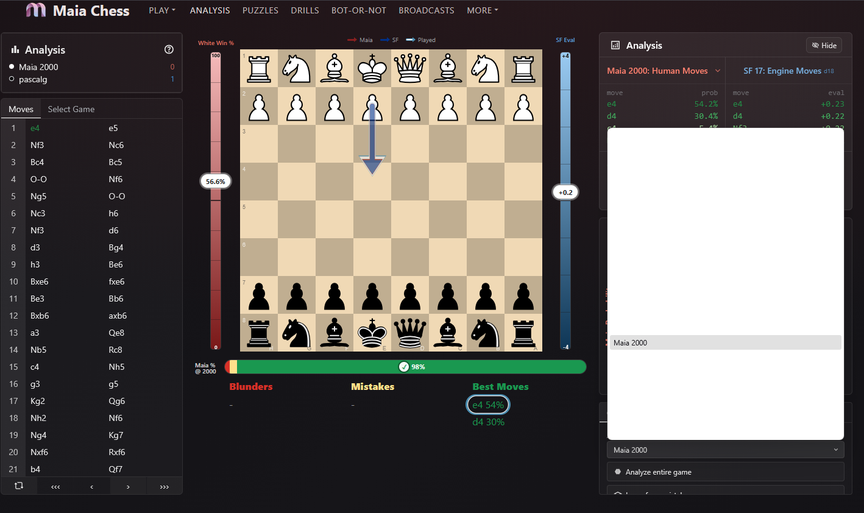
In the analysis window (after a game played), "Analysis using" option at the bottom, there is a bug with the all-white background when choosing the Maia engine (see screenshot).
@ashtonanderson
In the analysis window (after a game played), "Analysis using" option at the bottom, there is a bug with the all-white background when choosing the Maia engine (see screenshot).

@pascalg said ^
@ashtonanderson
In the analysis window (after a game played), "Analysis using" option at the bottom, there is a bug with the all-white background when choosing the Maia engine (see screenshot).
Thank you! I just deployed a fix for various other places in the platform. Please let me know if you find any that I missed.
@pascalg said [^](/forum/redirect/post/rqRWzC2A)
> @ashtonanderson
>
> In the analysis window (after a game played), "Analysis using" option at the bottom, there is a bug with the all-white background when choosing the Maia engine (see screenshot).
>
> 
Thank you! I just deployed a fix for various other places in the platform. Please let me know if you find any that I missed.


